
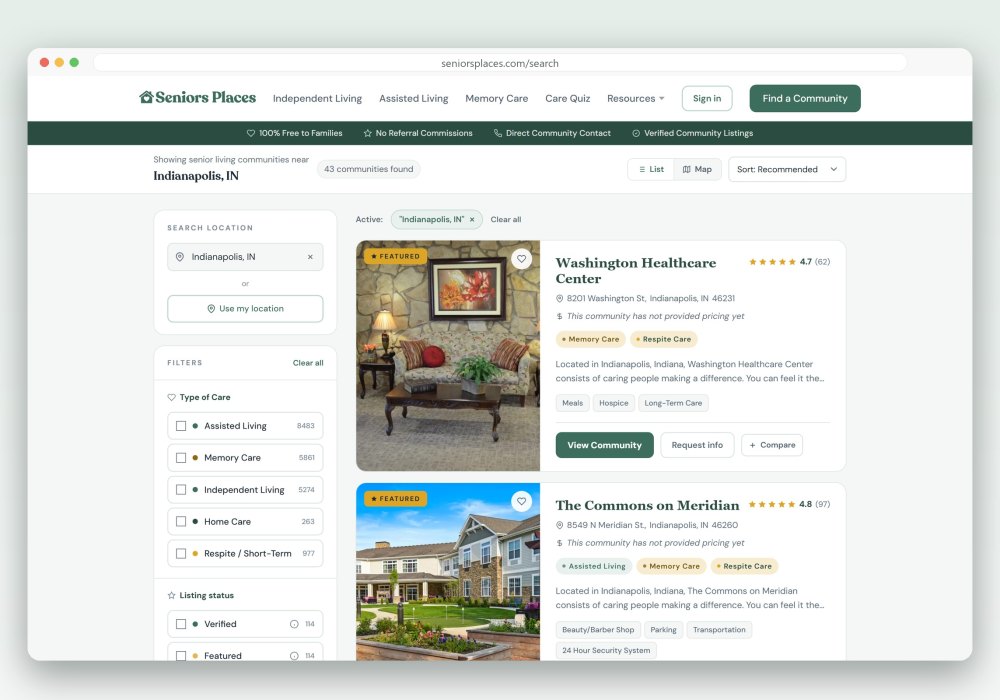
Key Takeaways
- Search now has a monthly budget filter and shows what communities in each area typically charge.
- Compare up to three communities side by side, and your saved communities stay in your account.
- The two-minute care quiz suggests a level of care, and nobody calls you afterwards.
- Your inquiry goes to the community you chose, and the form tells you exactly who receives it before you send.
Searching for senior living is one of the hardest things a family does, and it usually happens under pressure: a fall, a diagnosis, a hospital discharge with a deadline attached. The last thing anyone needs at that moment is a website that makes it harder. So when Inertia Digital Marketing acquired Seniors Places this spring, we made one decision before anything else. We would rebuild the whole site around the family doing the searching, and we would keep it free for them, with no referral fees and no one paid to steer them.
The new Seniors Places is live today. Here is what changed for you, and why.
You can search by what you can afford
Price is the first question every family asks and the last thing most directories will tell you. On the new site, the search has a monthly budget filter, and every area shows what communities there typically charge, so you can see at a glance whether a neighborhood is in reach before you spend an afternoon touring it.
Where a community shares its starting rate, you see it on the listing. Where it does not, the listing says "pricing on request" rather than hiding the fact. We also reward communities for being open about price, so more of them are publishing rates than before. If you want the fuller picture first, the cost guide explains what a monthly rate usually includes and what it does not, and our state-by-state figures show where your area sits.
You can compare communities side by side
After the second or third tour, communities start to blur together. The new compare tool puts up to three of them on one screen: care types, amenities, pricing, photos and reviews, lined up so the differences are obvious. Save communities as you go and they stay in your account, so you can pick the comparison up on your phone in the parking lot or at the kitchen table that evening.
You can find out which type of care fits, without a sales call
Independent living, assisted living, memory care, home care: the labels matter, and getting the level wrong is expensive in both directions. The new care quiz takes about two minutes and suggests a level of care based on how your parent is doing day to day. Nobody calls you afterwards. It exists to point you at the right part of the search, and that is all it does.
Community pages that tell you what you actually want to know
Every community page now brings together the things families ask about on a tour: the types of care offered, additional services like therapy or hospice, amenities, photos and video, pricing where shared, and reviews pulled in from Google and Facebook. For many communities you can also request a tour with a specific day and time of day, straight from the page.
Your inquiry goes to the community, and you are told so
This is the part we care about most. On Seniors Places, when you ask a question or request a tour, your details go to the community you chose. Before you press send, the form tells you exactly who will receive your information. Verified communities receive inquiries exclusively. In the rare case where a community's profile is unverified and there is no contact on file, we say so and tell you who will help instead. You will never be surprised by a call from someone you did not contact.
We can do this because of how Seniors Places makes its money. Communities pay for optional listing plans. Families never pay, and we never take a percentage of a move-in. That means no listing is ranked by what it pays us, and nobody here has a reason to push you toward one community over another. If you want the longer explanation, it is on our commission-free page.
Tools for the tour itself
The Community Tour Checklist is the thing we wish every family had on the first visit: 48 questions in eight sections, from the front door to the fee schedule, that you can work through on your phone during the tour. No account needed. A free account saves your completed checklist across devices and adds a printable copy, one for each community you visit.
Alongside it, the resources section gathers our guides on the questions that come up most: how the levels of care differ, what Medicare does and does not cover, how families pay for care, and the veterans benefits many families never claim.
What has not changed
Seniors Places is still a directory, not an agency. We do not place your parent; we help you find, understand and contact the communities that might. It is still free. And it still covers independent living, assisted living, memory care and home care in every state, with hundreds of new communities added and verified every week.
Where to start
If you are at the beginning, take the two-minute care quiz. If you already know the type of care, search by city and set your budget. If you have tours booked, open the checklist before you go. And if something on the new site is confusing, missing or wrong, reply to any email from us or write to [email protected]. A person reads it, usually the same day, and the site gets better because of it.
If you work at a senior living community, the new site was built for you too. Claiming your listing takes a few minutes at seniorsplaces.com/list-your-community.
- Assisted livingWhat it is, how it is licensed in your state, how to read a quote and how families pay.
- Memory careDementia care explained: staffing, training, costs and the questions that matter on a tour.
- Independent livingHousing with meals and services and no care in the fee: who it suits and what to ask.

What Is a CCRC? Continuing Care Retirement Community Costs and Contracts
How the entrance fee and monthly fee work, the three contract types, what to check in a CCRC's finances, and who it suits.

Senior Living in Phoenix: Neighborhoods, Costs and What to Expect
What senior living costs across the Valley, how the neighborhoods differ, and the heat, healthcare and Medicaid facts that matter in Phoenix.

What Is Respite Care? Short-Term Senior Living for Caregiver Breaks
A short stay in a community while the caregiver rests or travels: what it includes, what it costs, who pays, and how to arrange one.

The 30-Day Move-In Checklist for Senior Living
Week by week, everything that needs to happen between signing the agreement and the first good night's sleep in the new apartment.